

Fingerprints, Thumbprints, and Why the Same Certificate Shows Different Ones
Why Chrome, Windows, Firefox, OpenSSL, and PowerShell each show a different hash for the same certificate, what a fingerprint is computed over, how public key fingerprints differ, and when SHA-1 thumbprints are still safe to rely on.
You install a certificate, open it in Chrome, and paste the fingerprint into the change ticket. A colleague checks the same server from the Windows certificate store and gets a different value. OpenSSL gives a third one, uppercase with colons. Nobody made a mistake. Each tool is hashing something slightly different, or showing the same hash differently, and none of them mention it.
Here's what a fingerprint actually is, why it changes from one viewer to the next, what the separate public key fingerprint is for, and when a SHA-1 thumbprint is still perfectly fine.
What a fingerprint is
A certificate fingerprint is a hash of the certificate's complete DER encoding: the signed body, the signature algorithm, and the signature itself. Flip one bit anywhere and you get a different fingerprint.
That has two consequences people trip over.
First, the fingerprint isn't stored in the certificate. There's a long-running Security Stack Exchange thread about the difference between a certificate, a signature and a thumbprint, and it exists because people assume the thumbprint is a field the CA fills in. It can't be. It covers the signature, and the signature is the last thing produced. Every viewer computes it from the bytes it has in front of it. That's also why the Windows dialog lists it under Details with a different icon from the real fields: Windows calculates it, it isn't an X.509 attribute.
Second, thumbprint and fingerprint are the same thing. Microsoft says thumbprint. Browsers, OpenSSL, keytool and the RFCs say fingerprint. The only real difference between tools is which hash algorithm sits behind the label.
Why tools disagree
When two values should match and don't, it's nearly always one of these:
| Difference | What varies | How to spot it |
|---|---|---|
| Hash algorithm | SHA-256 is 64 hex characters, SHA-1 is 40, MD5 is 32. | Count the characters. |
| Object being hashed | The whole certificate, or only the public key inside it. | Look for a label such as Public Key or SPKI. |
| Presentation | Upper or lower case, colons, spaces, or no separators. | Strip separators and compare case-insensitively. |
A SHA-1 and a SHA-256 fingerprint of the same certificate have nothing in common. They aren't a short and long form of one value. They're two unrelated hashes of the same bytes.
One certificate, five viewers
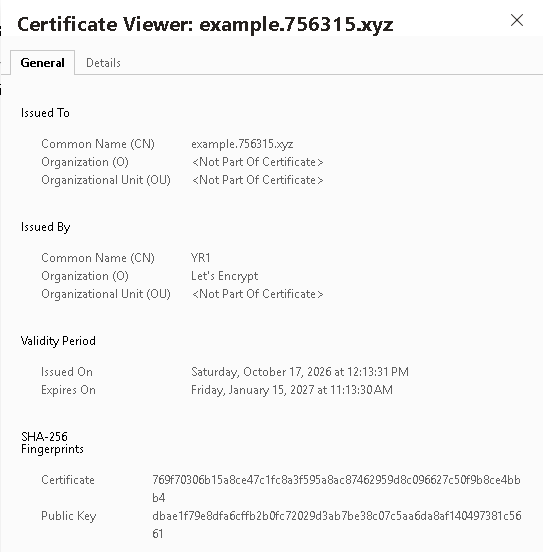
Every screenshot and command below is the same certificate, issued for example.756315.xyz by a Let's Encrypt staging CA.
Chrome and Edge
Chromium shows a SHA-256 Fingerprints section with two entries, Certificate and Public Key, lowercase with no separators. No SHA-1 anywhere.
The Windows certificate dialog
The Windows dialog, whether you reach it from certmgr.msc, certlm.msc or by double-clicking a .cer file, shows one Thumbprint on the Details tab. It's SHA-1: 40 lowercase hex characters, no separators.
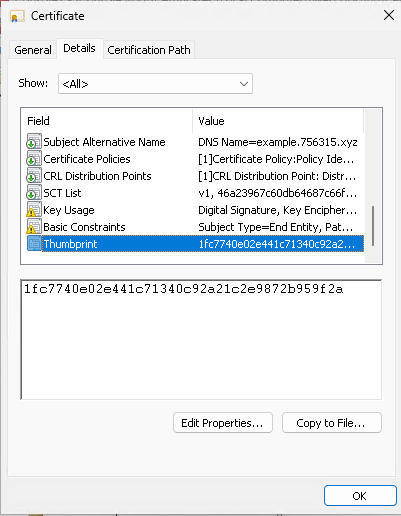
Older Windows versions had a Thumbprint algorithm row that said sha1. The row is gone; the algorithm isn't. The certificate store, IIS bindings, Group Policy and the Thumbprint property in PowerShell all still use SHA-1. That's an identifier choice rather than a weakness, for reasons covered at the end.
One trap worth knowing about: copying the thumbprint out of this dialog has, for years, picked up an invisible left-to-right mark at the start of the string. The pasted value looks right and fails to match anything. If a lookup fails for no reason you can see, delete and retype the first character.
Firefox
Firefox shows a SHA-256 Fingerprint and a SHA-1 Fingerprint, both over the whole certificate, uppercase hex with colons. It doesn't show a public key fingerprint.
OpenSSL
The default digest for -fingerprint is still SHA-1:
$ openssl x509 -in example.pem -noout -fingerprint
SHA1 Fingerprint=1F:C7:74:0E:02:E4:41:C7:13:40:C9:2A:21:C2:E9:87:2B:95:9F:2A

$ openssl x509 -in example.pem -noout -fingerprint -sha256
sha256 Fingerprint=76:9F:70:30:6B:15:A8:CE:47:C1:FC:8A:3F:59:5A:8A:C8:74:62:95:9D:8C:09:66:27:C5:0F:9B:8C:E4:BB:B4
Strip the colons and lowercase both lines and they match the Windows thumbprint and the Chrome certificate fingerprint exactly. OpenSSL always hashes the DER bytes, so a PEM copy and a DER copy of the same certificate produce the same fingerprint.
PowerShell and .NET
The Thumbprint property is SHA-1, uppercase, no separators:
PS> Get-ChildItem Cert:\LocalMachine\My | Format-Table Thumbprint, Subject

Thumbprint                               Subject
----------                               -------
1FC7740E02E441C71340C92A21C2E9872B959F2A CN=example.756315.xyz
If you want SHA-256 you have to ask for it:
PS> $cert = Get-Item Cert:\LocalMachine\My\1FC7740E02E441C71340C92A21C2E9872B959F2A
PS> $cert.GetCertHashString([System.Security.Cryptography.HashAlgorithmName]::SHA256)
769F70306B15A8CE47C1FC8A3F595A8AC87462959D8C096627C50F9B8CE4BBB4
Java keytool
keytool -printcert -file example.cer prints SHA1 and SHA256 certificate fingerprints, uppercase with colons. Older JDKs printed MD5 as well.
Certificate fingerprints versus public key fingerprints
Chrome's Public Key line is a different kind of value altogether. It's the SHA-256 hash of the certificate's SubjectPublicKeyInfo, the DER structure that holds the key algorithm and the key itself. Subject, dates, extensions, issuer and signature are all outside it.
That changes how it behaves over time:
- Renew with the same key pair and the certificate fingerprint changes but the public key fingerprint doesn't.
- Renew with a fresh key pair and both change.
- Cross-signed or re-issued certificates for the same key share a public key fingerprint and have different certificate fingerprints.
Use the public key fingerprint when the key is what you care about, not the particular certificate around it. The retired HTTP Public Key Pinning standard pinned Base64 SHA-256 hashes of the SubjectPublicKeyInfo for exactly this reason. SSH host key fingerprints are the same idea, which is why they look like SHA256: followed by Base64.
The Subject Key Identifier extension is related but not the same thing. RFC 5280 suggests deriving it from a SHA-1 hash of the key, and many CAs do, but it's a value the CA picks. Don't treat it as something you can recompute and compare.
To get the SPKI hash yourself:
$ openssl x509 -in example.pem -noout -pubkey \
    | openssl pkey -pubin -outform DER \
    | openssl dgst -sha256
Two things that look like fingerprints and aren't
A serial number is assigned by the CA and is only unique within that CA. It's a field in the certificate, not a hash of it. It's the right thing to use for revocation lookups, where it's always paired with the issuer, and the wrong thing for identifying a certificate on its own.
A signature is also derived from a hash, but of the certificate body only, and only the CA can produce it. It proves who issued the certificate. The fingerprint, computed afterwards over everything including the signature, only identifies the exact bytes you happen to be holding.
Is a SHA-1 thumbprint still safe?
Depends what you're doing with it.
In 2019 two Microsoft researchers published a paper called Are Certificate Thumbprints Unique? and found that thumbprints fall short as unique identifiers in two different ways.
The obvious one is collisions. If the hash allows chosen-prefix collisions, an attacker can construct two different certificates with the same thumbprint. The paper called this practical for MD5 and imminent for SHA-1, and a chosen-prefix SHA-1 collision was published in early 2020. Someone who gets a harmless certificate onto an allowlist by SHA-1 thumbprint could later show up with a different one that hashes the same.
The less obvious one is malleability, and it doesn't need a broken hash at all. A valid certificate can often be re-encoded, or have its ECDSA signature swapped for its mathematically equivalent twin, so that it still validates and still carries the same key but has a different fingerprint under every algorithm, SHA-256 included. A blocklist that refuses a known-bad certificate by fingerprint can be sidestepped with a mauled copy.
The authors also scanned a large corpus of internet certificates, found no collisions in the wild, and judged a real attack to need a very capable adversary. That's context, not a reason to shrug.
What it comes down to in practice:
- Comparing by eye against a value from a trusted source is fine with SHA-1 when the attacker had no hand in producing the certificate. Use SHA-256 anyway when both sides can show it.
- Looking up a certificate you already hold by SHA-1 thumbprint, which is what Windows and IIS do, is indexing, not a trust decision. Nothing external can influence it.
- Allowlisting in software should use SHA-256, should prefer the public key fingerprint when the key is what matters, and ideally should compare the full DER bytes.
- Denying by fingerprint is weak under any algorithm because of malleability. Deny by issuer and serial, or by public key.
When two values don't match
- Count the hex characters. Different lengths mean different algorithms, and the values were never going to match.
- Check the label. A Public Key fingerprint will never match a certificate fingerprint.
- Remove colons and spaces and compare in one case.
- Make sure both sides are looking at the same certificate. A per-hostname certificate or a stale load balancer binding is a far more common cause than anything to do with hashing.
- Watch for invisible characters pasted from the Windows dialog.
If you want all of the values side by side without a shell, paste the certificate into the fingerprint calculator. It shows SHA-256, SHA-1 and MD5 of the certificate and the SHA-256 of the public key, switches between the formats each viewer uses, and will tell you which hash a value you've been handed actually is. The certificate decoder shows the two certificate fingerprints alongside the subject, issuer, validity and extensions. And when you write a fingerprint into an inventory or a ticket, make it the SHA-256 certificate fingerprint and say so. It'll still match whatever viewer the next person opens.
Further reading
- Are Certificate Thumbprints Unique? by Greg Zaverucha and Dan Shumow, IACR Cryptology ePrint Archive, for the collision and malleability analysis.
- RFC 5280, for the certificate structure fingerprints are computed over and the Subject Key Identifier derivations.
- RFC 7469, the original HTTP Public Key Pinning specification, for the Base64 SubjectPublicKeyInfo hash format.
- Your vendor's documentation for how its store or appliance exposes fingerprints. F5 and Microsoft both document the algorithm and format their interfaces use.